Originally for Statistics 133, by Phil Spector.
As an example of how to extract information from a web page, consider
the task of extracting the spring baseball schedule for the Cal Bears
from http://
Reading a web page into R
Read the contents of the page into a vector of character strings with
the readLines function:
> thepage = readLines('http://calbears.cstv.com/sports/m-basebl/sched/cal-m-basebl-sched.html')
Warning message:
In readLines("http://calbears.cstv.com/sports/m-basebl/sched/cal-m-basebl-sched.html") :
  incomplete final line found on 'http://calbears.cstv.com/sports/m-basebl/sched/cal-m-basebl-sched.html'
The warning messages simply means that the last line of the web page didn’t contain a newline character. This is actually a good thing, since it usually indicates that the page was generated by a program, which generally makes it easier to extract information from it.
Now we have to focus in on what we’re trying to extract. The first step
is finding where it is. If you look at the web page, you’ll see that the
title “Opponent / Event” is right above the data we want. We can locate
this line using the grep function:
> grep('Opponent / Event',thepage)
[1] 513
If we look at the lines following this marker, we’ll notice that the first date on the schedule can be found in line 536, with the other information following after:
> thepage[536:545]
 [1] "      <td class=\"row-text\">02/20/11</td>"
 [2] "      "
 [3] "      <td class=\"row-text\">vs. Utah</td>"
 [4] "      "
 [5] "      <td class=\"row-text\">Berkeley, Calif.</td>"
 [6] "      "
 [7] "      <td class=\"row-text\">W, 7-0</td>"
 [8] "      "
 [9] "      </tr>"
[10] "      "
Based on the previous step, the data that we want is always preceded by
the HTML tag “<td class="row-text»”, and followed by “</td>”. Let’s
grab all the lines that have that pattern:
> mypattern = '<td class="row-text">([^<]*)</td>'
> datalines = grep(mypattern,thepage[536:length(thepage)],value=TRUE)
I used value=TRUE, so I wouldn’t have to worry about the indexing when
I restricted myself to the lines from 550 on. Also notice that I’ve
already tagged the part that I want, in preparation to the final call
to gsub.
Now that I’ve got the lines where my data is, I can use gregexpr,
then getexpr (from the previous lecture), and gsub to extract the
information without the HTML tags:
> getexpr = function(s,g)substring(s,g,g+attr(g,'match.length')-1)
> gg = gregexpr(mypattern,datalines)
> matches = mapply(getexpr,datalines,gg)
> result = gsub(mypattern,'\\1',matches)
> names(result) = NULL
> result[1:10]
 [1] "02/19/11"      "vs. Utah"      "Evans Diamond" "1:00 p.m. PT"
 [5] "02/20/11"      "vs. Utah"      "Evans Diamond" "1:00 p.m. PT"
 [9] "02/22/11"      "at Stanford"
It seems pretty clear that we’ve extracted just what we wanted - to make it more usable, we’ll convert it to a data frame and provide some titles. Since it’s hard to describe how to convert a vector to a data frame, we’ll use a matrix as an intermediate step. Since there are four pieces of information (columns) for each game (row), a matrix is a natural choice:
> schedule = as.data.frame(matrix(result,ncol=4,byrow=TRUE))
> names(schedule) = c('Date','Opponent','Location','Result')
> head(schedule)
      Date                 Opponent         Location        Result
1 02/19/11                 vs. Utah    Evans Diamond  1:00 p.m. PT
2 02/20/11                 vs. Utah    Evans Diamond  1:00 p.m. PT
3 02/22/11              at Stanford Stanford, Calif.  5:30 p.m. PT
4 02/25/11      at Coastal Carolina     Conway, S.C.  4:00 p.m. ET
5 02/26/11         vs. Kansas State     Conway, S.C. 11:00 a.m. ET
6     vs. North Carolina State     Conway, S.C. 11:30 a.m. ET
Another Example
At http://
> x = readLines('http://www.imdb.com/chart/')
> grep('Rank',x)
[1] 1294 1546 1804
Starting with line 1294 we can look at the data to see where the information is. A little experimentation shows that the useful data starts on line 1310:
> x[1310:1318]
 [1] "      <td class=\"chart_even_row\">"
 [2] "          <a href=\"/title/tt0990407/\">The Green Hornet</a> (2011)"
 [3] "      </td>"
 [4] "      <td class=\"chart_even_row\" style=\"text-align: right; padding-right: 20px\">"
 [5] "          $33.5M"
 [6] "      </td>"
 [7] "      <td class=\"chart_even_row\" style=\"text-align: right\">"
 [8] "          $40M"
 [9] "      </td>"
[10] "    </tr>"
There are two types of lines that contain useful data: the ones with the title, and the ones that begin with some blanks followed by a dollar sign. Here’s a regular expression that will pull out both those lines:
> goodlines = '<a href="/title[^>]*>(.*)</a>.*$|^ *\\$'
> try = grep(goodlines,x,value=TRUE)
Looking at the beginning of try, it seems like we got what we want:
> try[1:10]
[1] " <a href=\"/title/tt1564367/\">Just Go with It</a> (2011)"
[2] " $30.5M"
[3] " $30.5M"
[4] " <a href=\"/title/tt1702443/\">Justin Bieber: Never Say Never</a> (2011)"
[5] " $29.5M"
[6] " $30.3M"
[7] " <a href=\"/title/tt0377981/\">Gnomeo & Juliet</a> (2011)"
[8] " $25.4M"
[9] " $25.4M"
[10] " <a href=\"/title/tt1034389/\">The Eagle</a> (2011)" Sometimes the trickiest part of getting the data off a webpage is
figuring out exactly the part you need. In this case, there is a lot of
extraneous information after the table we want. By examining the output,
we can see that we only want the first 30 entries. We also need to
remove the extra information from the title line. We can use
the sub function with a modified version of our regular expression:
> try = try[1:30]
> try = sub('<a href="/title[^>]*>(.*)</a>.*$','\\1',try)
> head(try)
[1] "          Just Go with It"
[2] "          $30.5M"
[3] "          $30.5M"
[4] "          Justin Bieber: Never Say Never"
[5] "          $29.5M"
[6] "          $30.3M"
Once the spaces at the beginning of each line are removed, we can rearrange the data into a 3-column data frame:
> try = sub('^ *','',try)
> movies = data.frame(matrix(try,ncol=3,byrow=TRUE))
> names(movies) = c('Name','Wkend Gross','Total Gross')
> head(movies)
                            Name Wkend Gross Total Gross
1                Just Go with It      $30.5M      $30.5M
2 Justin Bieber: Never Say Never      $29.5M      $30.3M
3           Gnomeo & Juliet      $25.4M      $25.4M
4                      The Eagle      $8.68M      $8.68M
5                   The Roommate      $8.13M      $25.8M
6         The King's Speech      $7.23M      $93.7M
We can replace the special characters with the following code:
> movies$Name = sub('&','&',movies$Name)
> movies$Name = sub(''','\'',movies$Name)
Dynamic Web Pages
While reading data from static web pages as in the previous examples can
be very useful (especially if you’re extracting data from many pages),
the real power of techniques like this has to do with dynamic pages,
which accept queries from users and return results based on those
queries. For example, an enormous amount of information about genes and
proteins can be found at the National Center of Biotechnology
Information website (http://
Here is a simple example that illustrate the concept of accessing
dynamic information from web pages. The
page http://aapl for Apple Computer), you will be directed to a page whose
URL (as it appears in the browser address bar) is
http://finance.yahoo.com/q?s=aapl&x=0&y=0The way that stock symbols are mapped to this URL is pretty obvious. We’ll write an R function that will extract the current price of whatever stock we’re interested in.
The first step in working with a page like this is to download a local copy to play with, and to read the page into a vector of character strings:
> download.file('http://finance.yahoo.com/q?s=aapl&x=0&y=0','quote.html')
trying URL 'http://finance.yahoo.com/q?s=aapl&x=0&y=0'
Content type 'text/html; charset=utf-8' length unknown
opened URL
.......... .......... .......... .........
downloaded 39Kb
> x = readLines('quote.html')
To get a feel for what we’re looking for, notice that the words “Last Trade:” appear before the current quote. Let’s look at the line containing this string:
> grep('Last Trade:',x)
45
> nchar(x[45])
[1] 3587
Since there are over 3500 characters in the line, we don’t want to view
it directly. Let’s use gregexpr to narrow down the search:
> gregexpr('Last Trade:',x[45])
[[1]]
[1] 3125
attr(,"match.length")
[1] 11
This shows that the string “Last Trade:” starts at character 3125. We
can use substr to see the relevant part of the line:
> substring(x[45],3125,3220)
[1] "Last Trade:</th><td class=\"yfnc_tabledata1\"><big><b><span id=\"yfs_l10_aapl\">363.50</span></b></b"
There’s plenty of context - we want the part surrounded
by <big><b><span ... and </span>. One easy way to grab that part is
to use a tagged regular expression with gsub:
> gsub('^.*<big><b><span [^>]*>([^<]*)</span>.*$','\\1',x[45])
[1] "363.50"
This suggests the following function:
> getquote = function(sym){
+    baseurl = 'http://finance.yahoo.com/q?s='
+    myurl = paste(baseurl,sym,'&x=0&y=0',sep='')
+    x = readLines(myurl)
+    q = gsub('^.*<big><b><span [^>]*>([^<]*)</span>.*$','\\1',grep('Last Trade:',x,value=TRUE))
+    as.numeric(q)
+}
As always, functions like this should be tested:
> getquote('aapl')
[1] 196.19
> getquote('ibm')
[1] 123.21
> getquote('nok')
[1] 13.35
These functions provide only a single quote; a little exploration of the yahoo finance website shows that we can get CSV files with historical data by using a URL of the form:
http://ichart.finance.yahoo.com/table.csv?s=xxxwhere xxx is the symbol of interest. Since it’s a comma-separated
file, We can use read.csv to read the chart.
gethistory = function(symbol)
   read.csv(paste('http://ichart.finance.yahoo.com/table.csv?s=',symbol,sep=''))
Here’s a simple test:
> aapl = gethistory('aapl')
> head(aapl)
        Date   Open   High    Low  Close   Volume Adj.Close
1 2011-02-15 359.19 359.97 357.55 359.90 10126300    359.90
2 2011-02-14 356.79 359.48 356.71 359.18 11073100    359.18
3 2011-02-11 354.75 357.80 353.54 356.85 13114400    356.85
4 2011-02-10 357.39 360.00 348.00 354.54 33126100    354.54
5 2011-02-09 355.19 359.00 354.87 358.16 17222400    358.16
6 2011-02-08 353.68 355.52 352.15 355.20 13579500    355.20
Unfortunately, if we try to use the Date column in plots, it will not
work properly, since R has stored it as a factor. The format of the date
is the default for the as.Date function, so we can modify our function
as follows:
gethistory = function(symbol){
   data = read.csv(paste('http://ichart.finance.yahoo.com/table.csv?s=',symbol,sep=''))
   data$Date = as.Date(data$Date)
   data
}
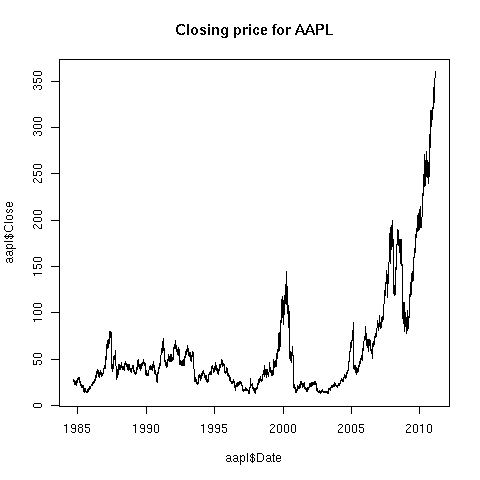
Now, we can produce plots with no problems:
> aapl = gethistory('aapl')
> plot(aapl$Date,aapl$Close,main='Closing price for AAPL',type='l')
The plot is shown below: